The Short Answer
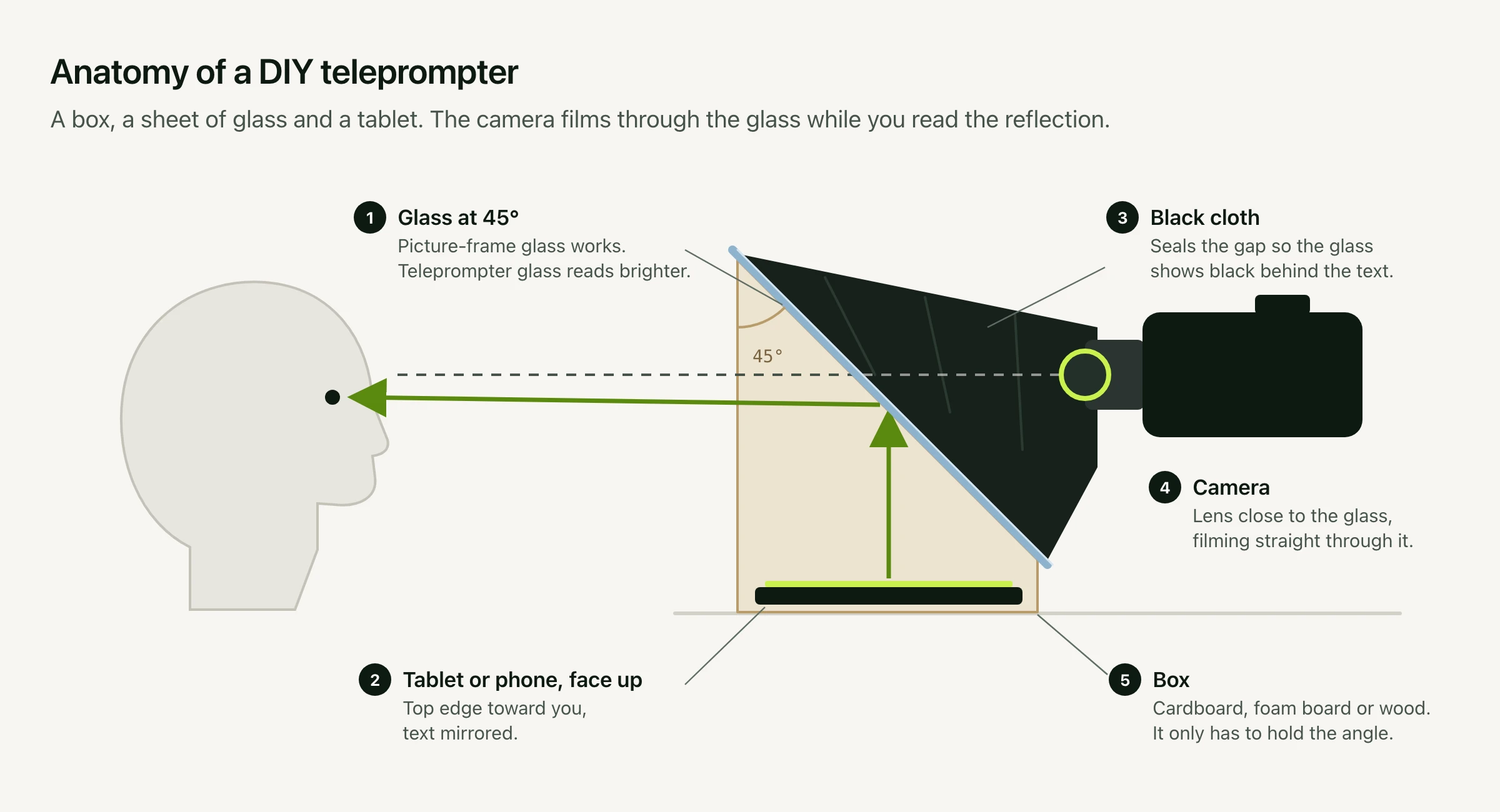
A DIY teleprompter needs five things:
- A sheet of glass held at 45° in front of the camera lens. Glass from a picture frame works. Teleprompter glass reads brighter.
- A tablet or phone lying face up under the glass, showing the script mirrored.
- A box to hold the glass at that angle. Cardboard is fine.
- A black cloth between the glass and the camera, so the only thing on the glass is your script.
- A teleprompter app that can mirror the text.
The camera films straight through the glass, and you read the script reflected in it, so your eyes stay on the lens. Allow an afternoon for the first build.
First, Check You Need Glass
If you record with a laptop's built-in webcam, you probably don't. The glass exists to put the words in front of the lens. On a laptop the camera sits at the top of the screen, so text placed right under it is already close enough. Viewers still read a glance as eye contact up to about 5° below the lens, and a prompter in the MacBook notch sits about 2° below. The eye-contact research is in our font size guide.
Build a glass rig when you film with a separate camera: a mirrorless camera, a camcorder, or a phone on a tripod. There's no screen beside those lenses, so the glass puts one there.
How It Works
The glass does two jobs at once. From the camera's side it's a window, so the lens films you through it. From your side it's a weak mirror that reflects the screen lying beneath it. With the space behind the glass kept dark, the reflected words are all you see, floating in front of the lens.
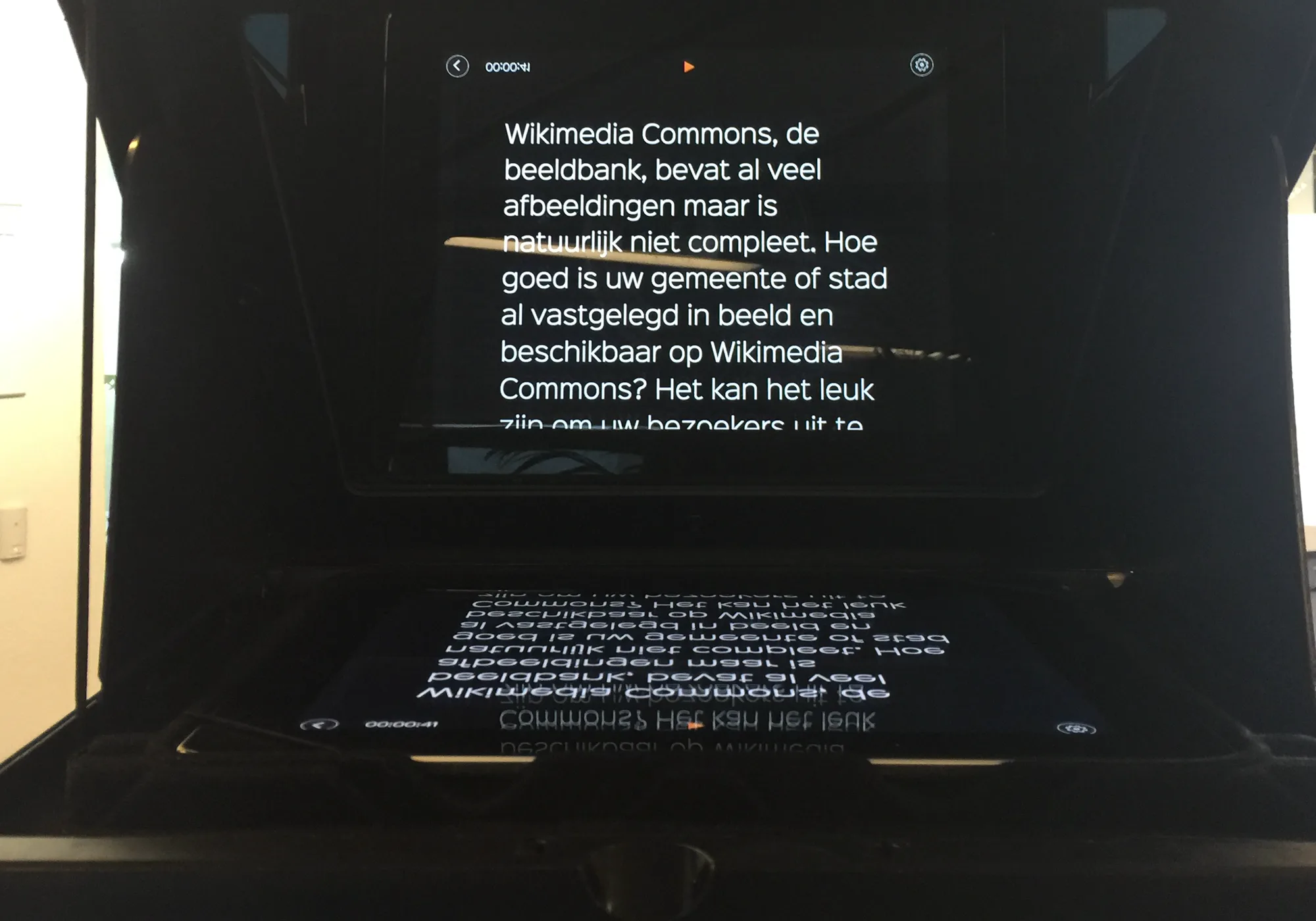
A reflection flips the image, so the screen has to show the script mirrored for it to read the right way round on the glass. That's the one thing your software has to do. How the trick works, and where it came from.
What You Need
- Glass: from a picture frame, or teleprompter glass, 2 to 3 mm thick. Acrylic works in a pinch, but it scratches easily and can flex, which warps what the camera sees.
- A screen: a tablet or phone. A tablet shows more of the script at a readable size.
- A box: cardboard, foam board, or a wooden frame, with square sides, a little deeper and wider than the screen.
- Black cloth: felt, blackout fabric, or a black T-shirt, to close off the space between the glass and the camera.
- Something to stand it on: a tripod for the camera, and books or a stand for the box, so the glass sits at your eye height.
- Tape: gaffer or masking tape for the glass edges, which can be sharp.
Pick Your Glass
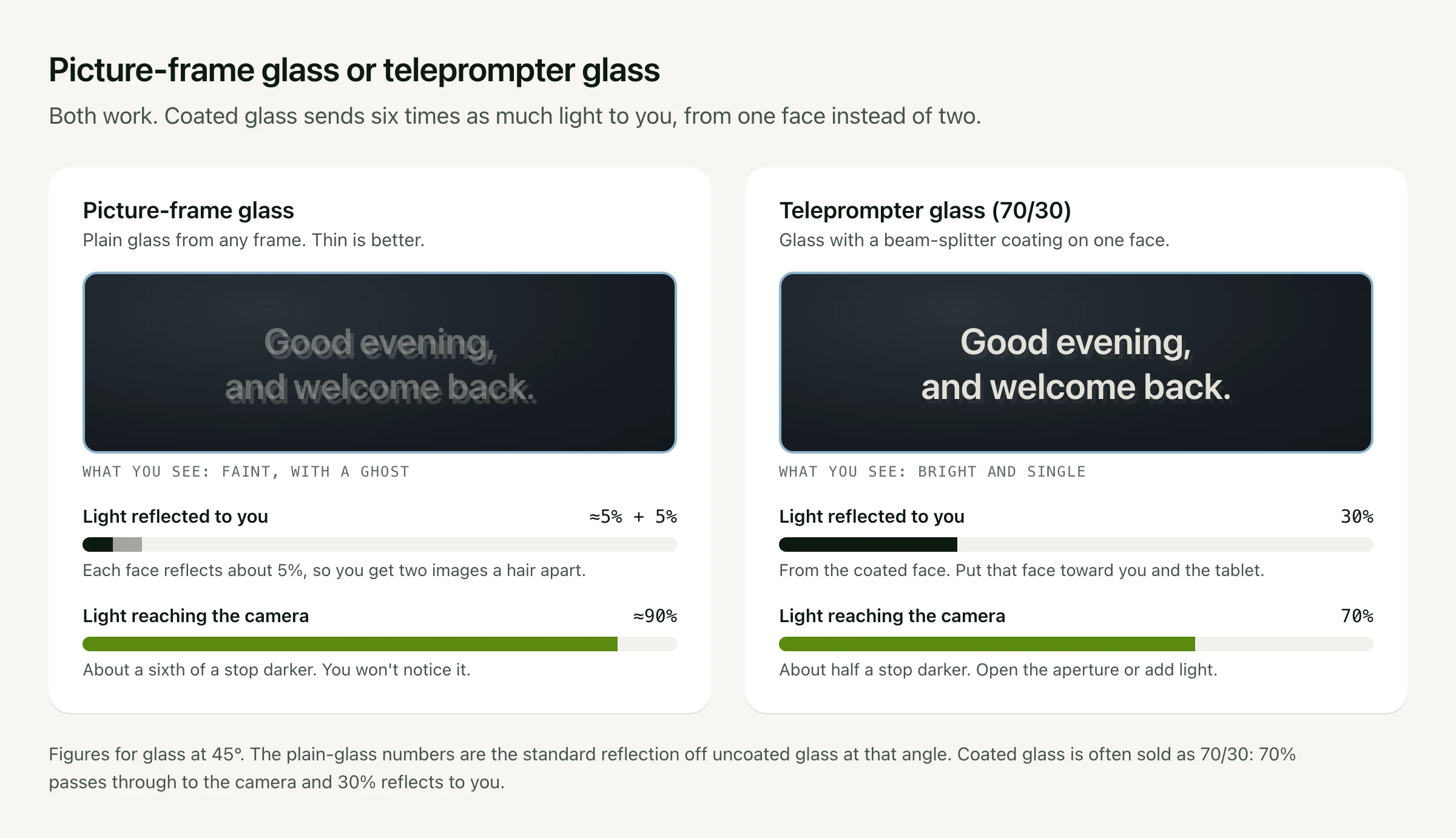
Plain glass reflects about 5% of the light from each of its two faces at this angle. You get two faint copies of the script, a main image and a ghost just behind it. That's readable in a dim room with the screen at full brightness and the black cloth in place. Thin glass keeps the ghost tight: the two copies sit about three-quarters of the glass thickness apart, so 2 mm glass puts them about 1.5 mm apart.
Teleprompter glass, also called beam-splitter glass, has a partly reflective coating on one face. The common 70/30 split lets 70% of the light through to the camera and reflects 30% of the screen to you, from that one face. The text is about six times brighter than on plain glass, and the ghost is faint enough to ignore. The cost is about half a stop of light at the camera, which a wider aperture or a little more light on your face makes up. Put the coated face toward you and the tablet.
Start with picture-frame glass. If you find yourself squinting or dimming the room more than you'd like, swap in teleprompter glass and keep the rest of the build.
Size the Glass
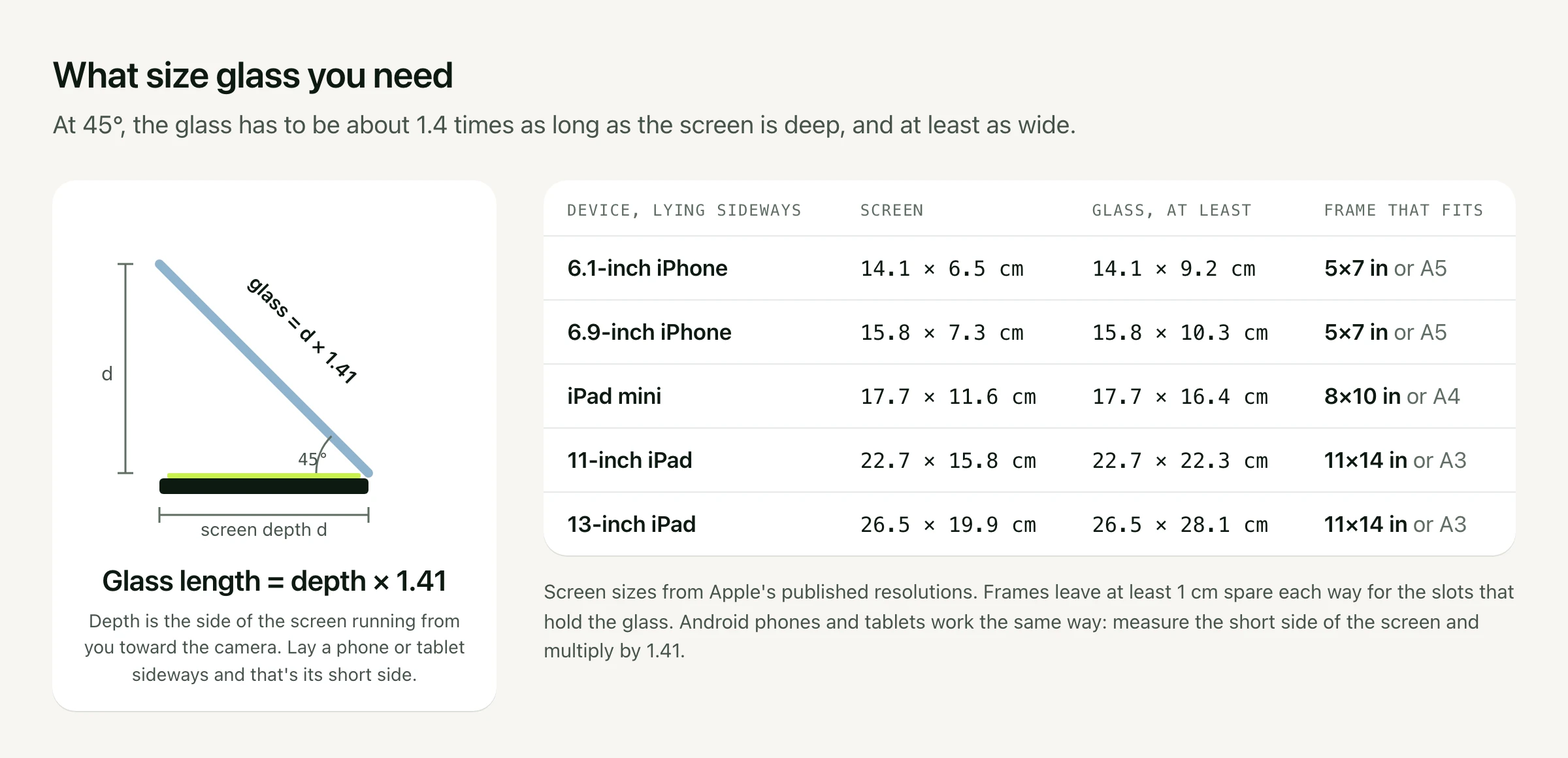
At 45°, the glass rises as high as the screen is deep, and its length along the slope is that depth times 1.41. It also has to be at least as wide as the screen. Lay the tablet or phone sideways, so its long side carries the lines of text, and measure the short side. That's the depth.
Build It, Step by Step
- Get a box with square sides, as tall as it is deep and a little bigger than the screen. Cut down a shipping box, or tape one together from foam board.
- Mark a diagonal on each side wall, from the top front corner to the bottom back corner. With square sides, that line is exactly 45°.
- Cut a slit along each diagonal, just wide enough for the glass to slide in and rest at the angle.
- Open the front and the top, and cut a hole in the back panel at the height where the lens will sit.
- Tape the glass edges and slide the glass into the slits. If it's coated glass, the coated face goes toward the front.
- Close off the back. Drape the black cloth over the top of the box behind the glass and around the lens, so the lens is the only opening on that side.
- Set it up. Lay the tablet face up on the floor of the box. Put the camera behind it with the lens at the hole, close to the glass. Raise the box on books or a stand until the glass is level with your eyes.
If the corners of the box show in the shot, move the lens closer to the glass or zoom in a little. Phone cameras are wide, so they show the edges first.
Get the Text Right
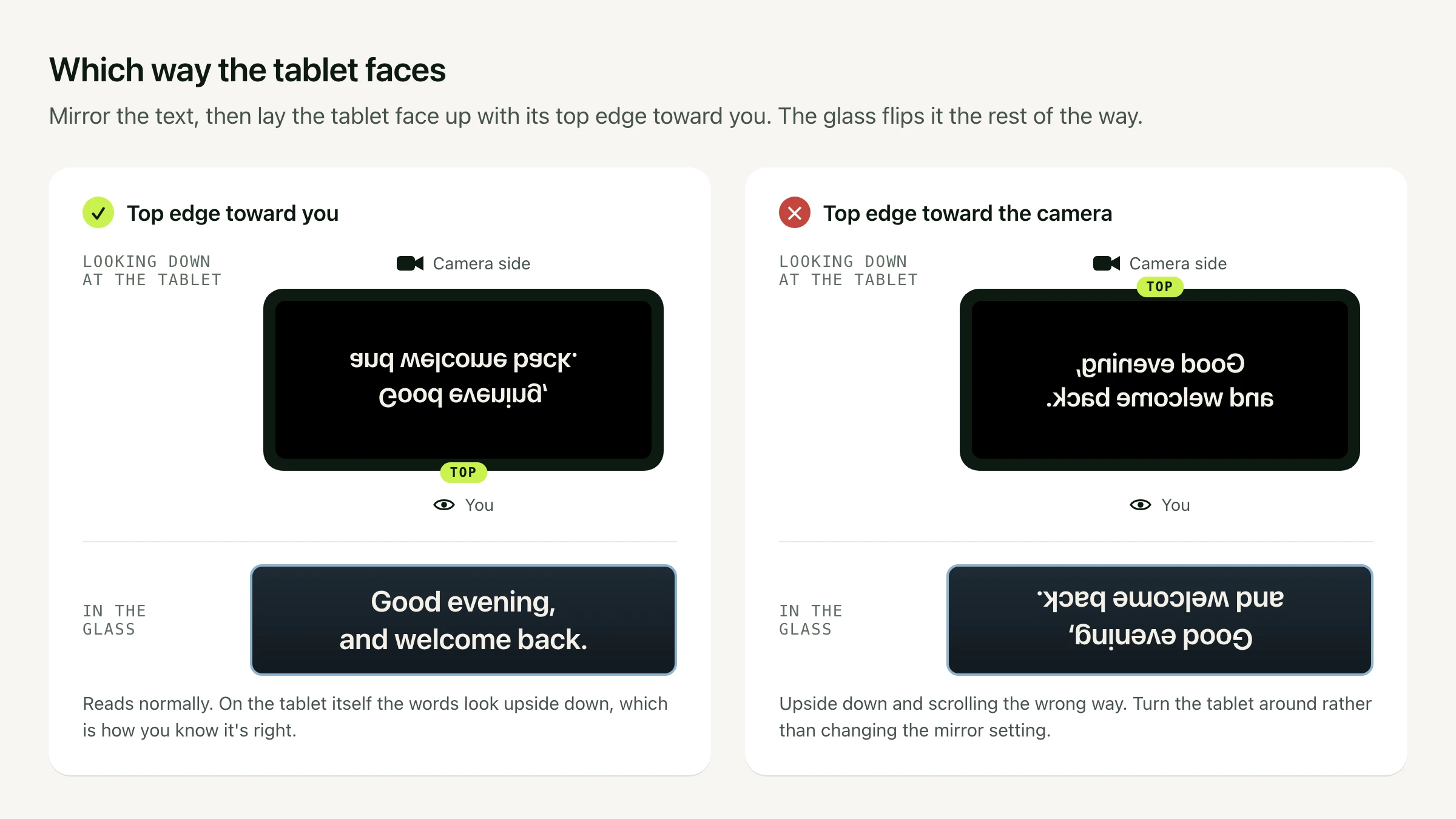
Two settings have to agree. Turn on mirrored text in your teleprompter app, then lay the tablet with its top edge toward you. Looking down at the tablet, the words will look upside down. In the glass, they read normally. If the glass shows the script upside down and scrolling the wrong way, turn the tablet around rather than changing the mirror setting.
- Lock the rotation. A tablet lying flat can flip its picture when you nudge it. On an iPad, turn on Rotation Lock in Control Center once the screen is the right way round.
- Keep the screen awake. Set Auto-Lock to Never in Settings › Display & Brightness, and plug the tablet in for long sessions.
- Turn the brightness all the way up and keep the text white on black. Black parts of the screen reflect nothing, so the camera sees straight through them.
- Go bigger on text size. You read from further away than on a laptop. Our font size guide starts at about 45 pt at 1 metre and 65 pt or more at 1.5 metres.
- Keep the lines short. Sideways eye movement is what viewers notice, and distance helps. A 15 cm line spans about 9° of eye movement at 1 metre and about 6° at 1.5 metres.
Run It From Your Mac With Avocado
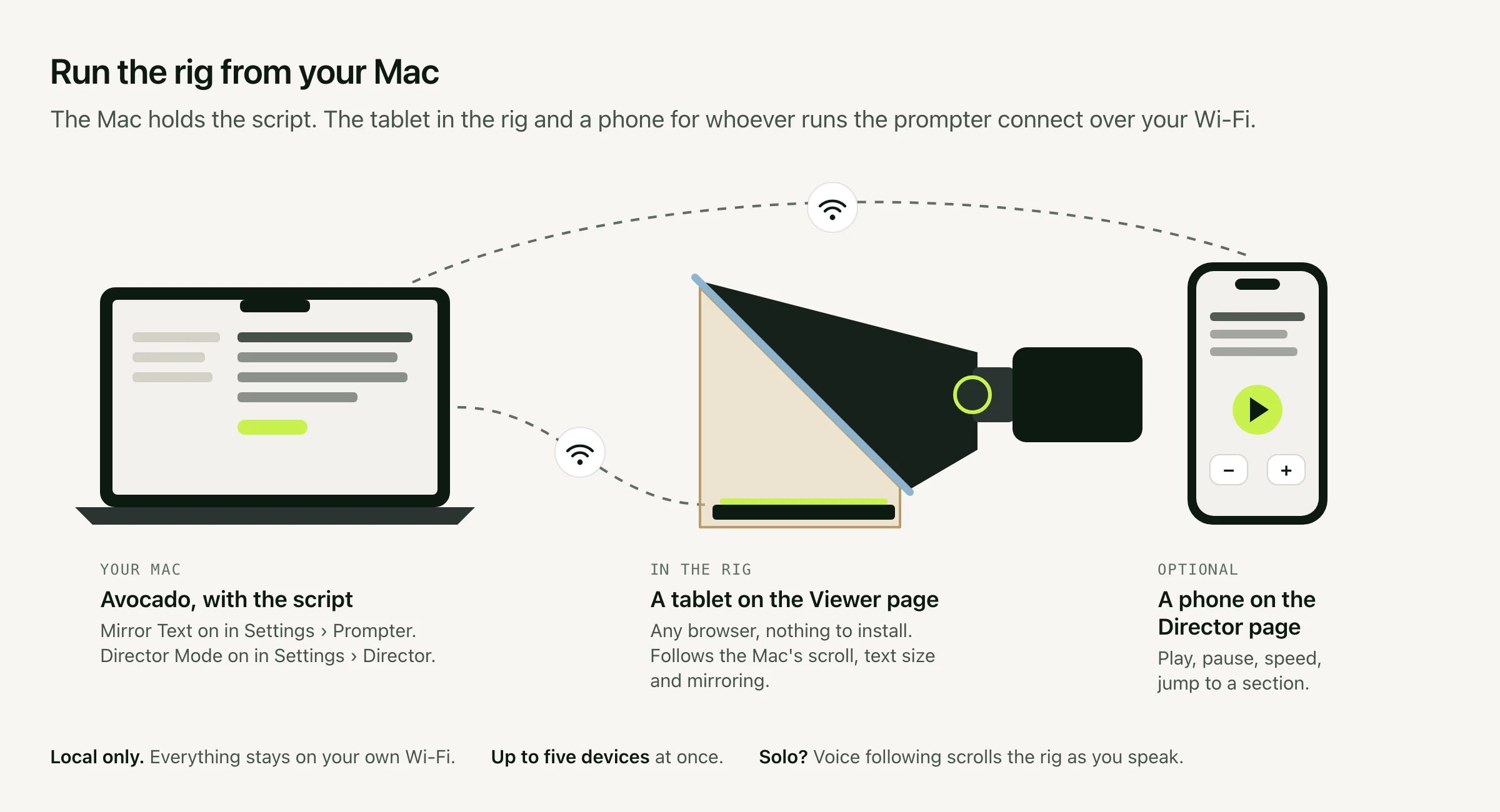
Avocado can run a rig in two ways.
With a display under the glass. Turn on Mirror Text in Settings › Prompter, under Hardware Teleprompters. It flips the whole prompter, the script and its controls, so everything reads correctly through the glass. Then put the floating prompter on whichever display sits under the glass: a monitor connected to your Mac, or an iPad used as a second display with Sidecar. Mirror Text is free.
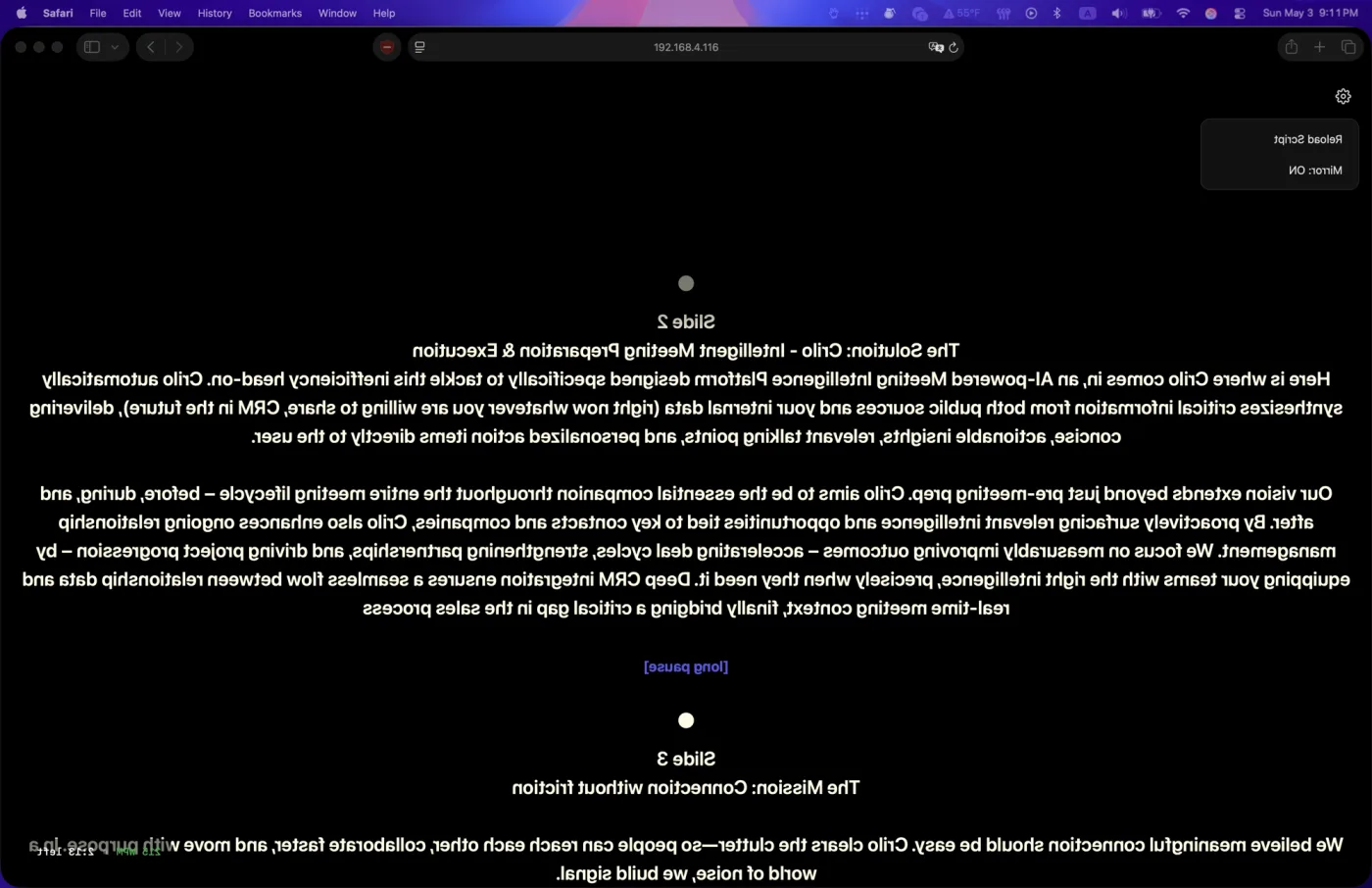
With a tablet over Wi-Fi. Turn on Director Mode in Settings › Director, which comes with Avocado Pro. Your Mac shows two QR codes. Scan the Viewer code with the tablet in the rig, and its browser shows a live copy of the prompter, with nothing to install. The Viewer follows the Mac's scroll position, text size, colours and mirroring. To mirror only the tablet and keep the Mac's own prompter readable, open the gear menu on the Viewer and turn Mirror on there.
The other code opens the Director page. Hand it to whoever runs the prompter, and they can play, pause, change speed and jump between sections from their phone while you look into the lens. Up to five devices can connect at once, and everything stays on your local Wi-Fi. More on Director Mode.
Recording alone? Avocado Pro's voice following listens through your Mac's microphone and scrolls the prompter as you speak, and the tablet in the rig follows along. If the Mac is across the room, choose a closer microphone in Settings, such as a USB or wireless lav.
Troubleshooting
| Problem | Fix |
|---|---|
| Two copies of every line | That's the back face of plain glass. Use thinner glass, or switch to teleprompter glass. |
| Text too faint to read | Turn the screen brightness up, dim the room, and close any gaps in the black cloth. |
| Text upside down in the glass | Turn the tablet around so its top edge faces you. |
| Text reads backwards | Turn mirrored text on. |
| Haze or reflections in the shot | Light is reaching the camera side of the glass. Seal the cloth around the lens, and keep lamps from shining onto the glass. |
| Box edges in the shot | Move the lens closer to the glass, or zoom in a little. |
| Picture flips when you touch the tablet | Turn on Rotation Lock. |
| Screen goes dark mid-take | Set Auto-Lock to Never. |
| You look like you're reading | Sit further back and narrow the text column, so each line takes less eye movement. |
Build or Buy?
Ready-made phone and tablet prompters use the same design, with coated glass, a folding hood and a camera mount. If you'll film with one every week, the better glass and quick setup are worth paying for, and everything above, from mirroring to which way the tablet faces, applies to them too. For a one-off shoot, or to find out whether you like reading from glass, the cardboard version costs little more than a picture frame.
