The Short Answer
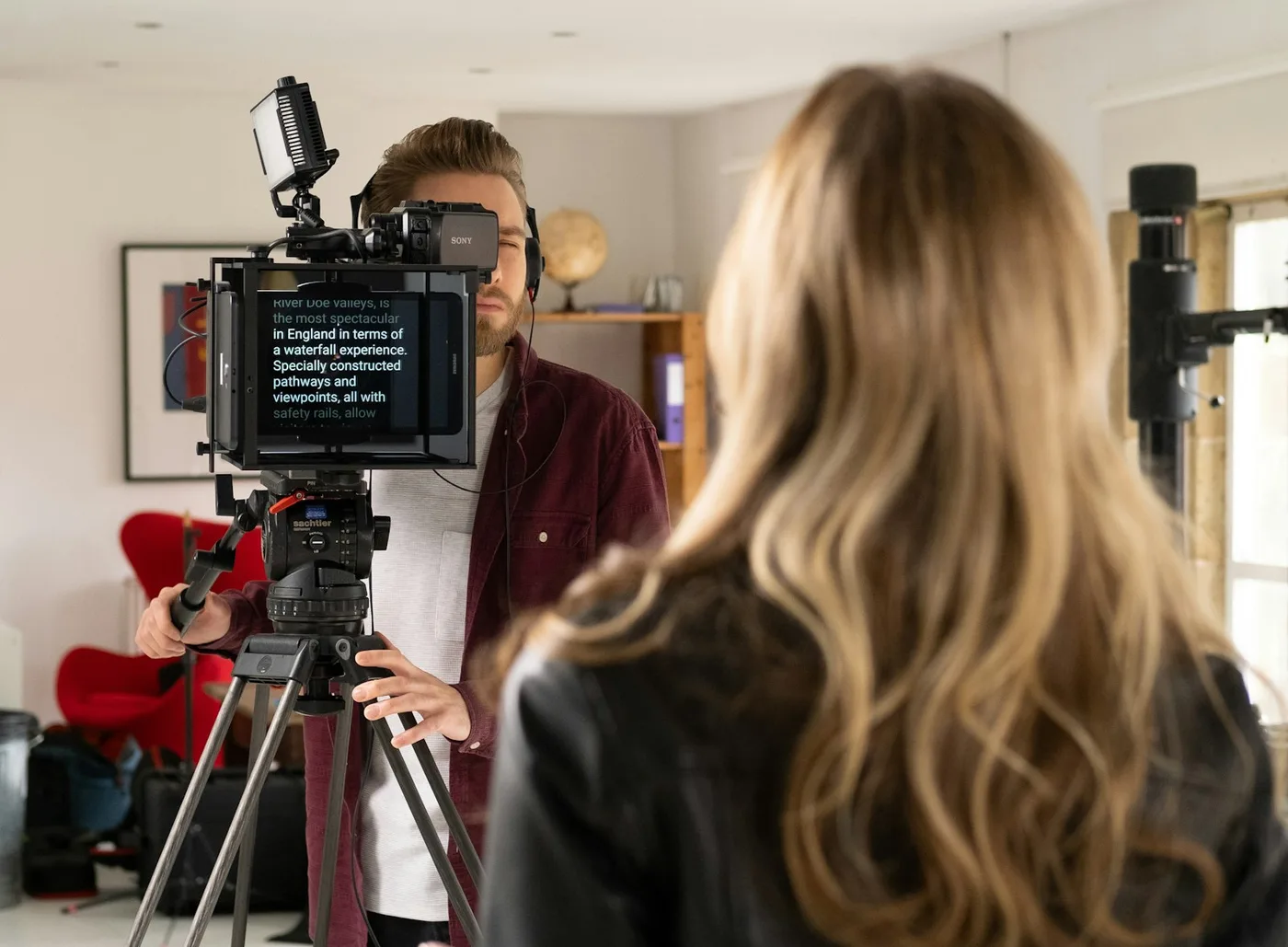
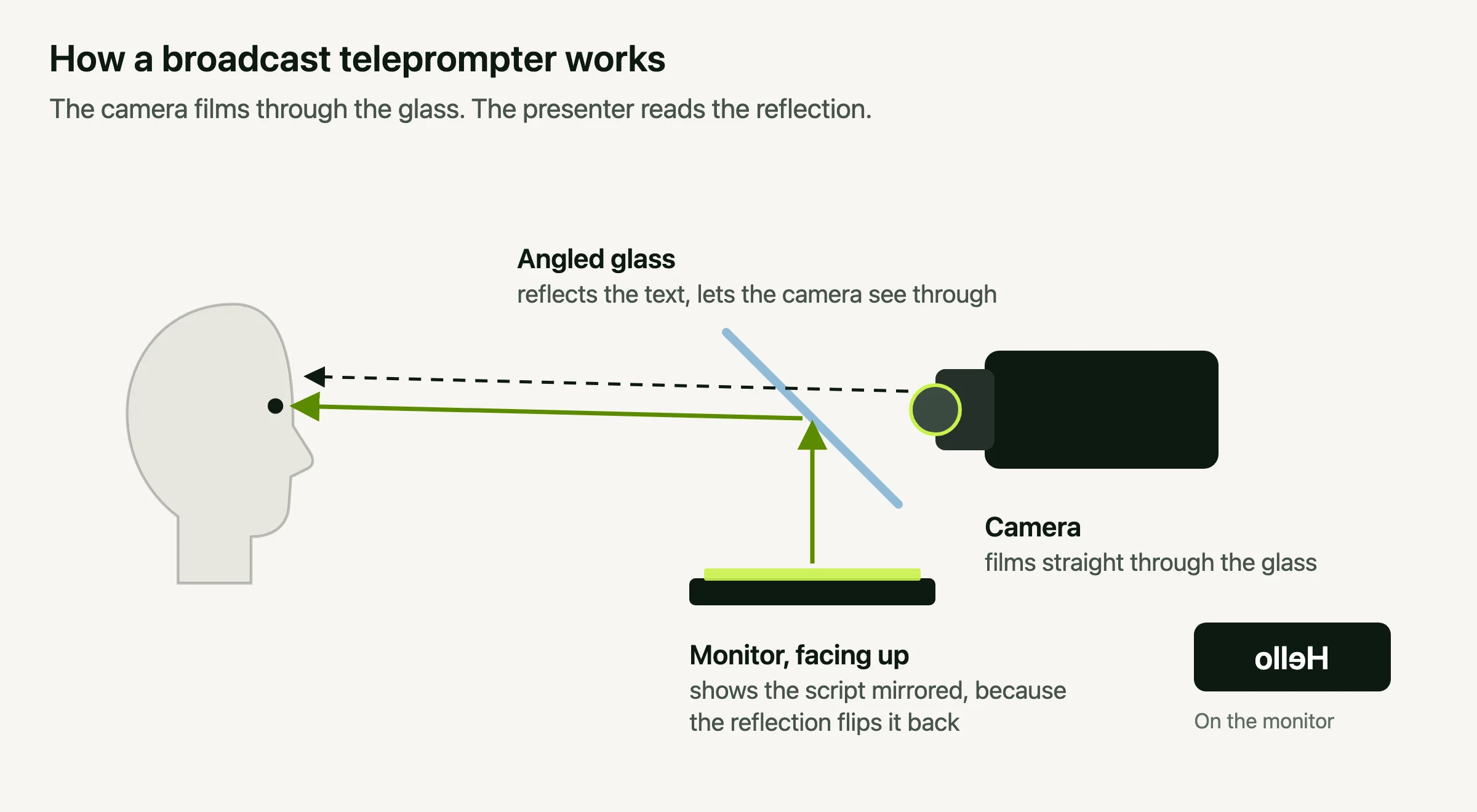
A teleprompter is a device or app that shows your script where your eyes already need to be, so you can read it while looking at the camera. The classic version puts a sheet of angled glass in front of the lens. A monitor below the glass shows the script, the glass reflects it toward you, and the camera films straight through the glass without seeing a word. To the audience, you're simply looking at them.
It's also called an autocue, which is the usual name in the UK, or simply a prompter. The person reading it is the talent or presenter, and the person who controls the scrolling is the operator. On a stage, a screen at the speaker's feet does a similar job, and that's called a confidence monitor.
How Does a Teleprompter Work?
A teleprompter works by reflection. A screen lies face up under a sheet of angled glass in front of the camera lens. The glass reflects the script up to the presenter's eyes, and the camera films straight through the glass, so the presenter can read while looking into the lens and the camera never sees the words. A teleprompter app on a laptop skips the glass and shows the script on screen right next to the camera.
The glass is called a beam splitter. It's coated so that it reflects some light and lets the rest pass through, a bit like a window at night that shows both the street outside and your own reflection. (If you're buying some, here's what the 70/30 and 60/40 ratings mean.)
The monitor lies face up underneath, and the glass sits at 45° in front of the lens. Light from the screen hits the glass and bounces toward the presenter, who sees the script floating in front of the camera. The camera, behind the glass, looks straight through it. Because the monitor's light is aimed up and away from the lens, the camera records the presenter and nothing else. A cloth hood around the camera keeps stray light off the back of the glass.
That's the whole idea, and it hasn't changed since the 1950s. Everything since, from motors to apps to notches, is a better way of getting text to the right spot.
Why the Text Is Backwards
Look at the monitor on a real prompter rig and the script is mirrored, right to left. That's because a reflection flips the image, so the screen has to show it reversed for the presenter to read it the right way round. Point a phone at the monitor and you'll see what looks like nonsense.
Software that shows text directly on your screen doesn't need any of this, because nothing reflects it. Most apps still have a mirror setting, because people use a laptop or tablet to drive a glass rig. If you're building one, here's how mirrored text works in practice.
Where It Came From
The teleprompter started with an actor. Fred Barton Jr. came up with the idea as a way to help performers with their lines, engineer Hubert Schlafly built the first one in 1950, and with Irving Berlin Kahn they founded the TelePrompTer Corporation. The first machine had no screen at all. An electric typewriter printed the script in inch-high letters on a long roll of paper, and an operator wound the roll forward as the actor read. Studios rented them for $30 an hour, a lot of money at the time.
Its first outing was on 4 December 1950, on the CBS soap opera The First Hundred Years. Politics followed fast. Herbert Hoover read from one at the 1952 Republican National Convention, and in January 1954 Dwight Eisenhower became the first president to deliver a State of the Union address with a teleprompter.
The early machines sat next to the camera, so presenters still looked slightly off to one side. The glass came next. Jess Oppenheimer, the producer of I Love Lucy, developed the first in-the-lens prompter, the angled-glass design still used today, and was granted US patents for it. "TelePrompTer" was a brand name, with those odd capital letters, until it became the everyday word for any prompter.
Who Reads It, Who Runs It
On a TV set, two people share a teleprompter. The reader, usually called the talent, says the words. The operator watches and listens, and speeds the script up or slows it down to match, with a hand control or foot pedal. A good operator follows the presenter so closely that the scroll never seems to lead.
Most people today have no operator, so the software does the job. Some apps scroll at a fixed speed you choose, which works if you can hold a steady pace. Others listen through your microphone and follow your voice, pausing when you pause. Avocado does this on your Mac, so no audio leaves it, and for English scripts it can follow word by word, highlight the next word to say and wait while you go off script.
The Laptop Version
On a laptop the camera is already a few centimetres from the screen, so you can skip the glass and put the text right next to the lens. How close matters more than you'd think. In a 2002 Stanford study, viewers still read a gaze as eye contact when the speaker looked up to about 5° below the camera, but only about 1° to either side. At arm's length, that's a band about 5 cm tall just under the lens.

On a MacBook, the notch around the camera sits right inside that band, which is why a wave of teleprompter apps now live in the notch. Video calls added one more requirement: the prompter must not show up when you share your screen. macOS lets an app mark its window so it appears on your display but never in a screen share, screenshot or recording. Native apps like Avocado use it, and browser tabs and text files can't. (If you're choosing one, here's how the Mac options compare.)
Reading One Without Looking Like It
A teleprompter can make delivery worse if it's set up badly. The tell-tale signs are a flat, even pace, eyes visibly sweeping across each line, and no pauses. Three things fix most of it:
- Write the way you talk. Short sentences and contractions read aloud far better than written prose. Here's how to write a script for the camera.
- Keep the lines short and close to the lens. The right font size and line width keep your eye movement too small to notice.
- Let the script follow you. A scroll that matches your pace, or follows your voice, lets you pause for effect.
For more, see how to use a teleprompter without looking like you're reading. To try it before you write anything, read one of these practice scripts.
What Teleprompters Cost
- Broadcast rigs, $2,000 to $10,000 or more. Glass, mounting, a dedicated monitor and usually an operator.
- Glass attachments, roughly $100 to $400. A small rig that clamps to a camera or phone, driven by a tablet. Real eye-line alignment, but more kit to set up for every shoot.
- Software, free to about $8 a month. No hardware at all. How well it works depends on how close the app can get the text to your camera. You can try one now with our free online teleprompter, which runs in your browser.
For most people recording on a laptop, software is the best of the three, because the camera is already where the text needs to be. Avocado is a free teleprompter for Mac that puts your script in the notch, stays out of screen shares, and follows your voice on Pro. It's on iPhone and iPad too.