Prices in this field now run from nothing to $39, and nearly every app does the basics well. That makes it a more interesting comparison than it used to be, because the real differences are in the details a feature list hides. (New to all this? Start with what a teleprompter is.)
A note before we start: we make Avocado, one of the apps below. Weigh our verdict with that in mind. Everything we say about the other apps comes from their own App Store listings, sites and repositories, and the table says when each was checked.
The Short List
- Best overall: Avocado. The most complete voice following here, which follows you word by word, marks the next word to say, waits while you ad-lib and learns your pace. Also the biggest free tier of the apps with a paid version, and the only one that covers what happens before and after the read: an AI assistant writing into your scripts, a producer running the prompter, and recording and cutting takes.
- One-time purchase: CueNotch, $29.99. Folders, PowerPoint import and a rehearsal coach, but no remote control or second screen.
- Free with no paid tier: Mootch, Textream, Snotch and NotchPrompter. They cover the basics in the notch. None of them lists rehearsal history or AI assistant access, and Textream needs macOS 15.
- Studio rigs: FluidPrompter and QPrompt. Foot pedals, stream decks and many synchronised screens.
- iPhone and iPad as well: Avocado and PromptSmart Pro. Avocado has its own iPhone and iPad app that follows your voice and records takes, and its Viewer puts your Mac's script on any phone or tablet. (The iPhone and iPad apps compared.)
- In a browser: CuePrompter and Speakflow. Nothing to install, but they show on a screen share. More on online teleprompters below.
Why the Notch Won
The reason all these apps crowd into the notch is a piece of research from 2002. Milton Chen at Stanford found that people still read your gaze as eye contact when you look up to about 5° below the camera, but only about 1° to either side. At arm's length from a laptop, 5° is about 5 cm. The space right under a MacBook camera is the only place on the screen where you can read a script and still look like you're talking to someone. A window in the middle of the screen sits about 10° down, and viewers notice.
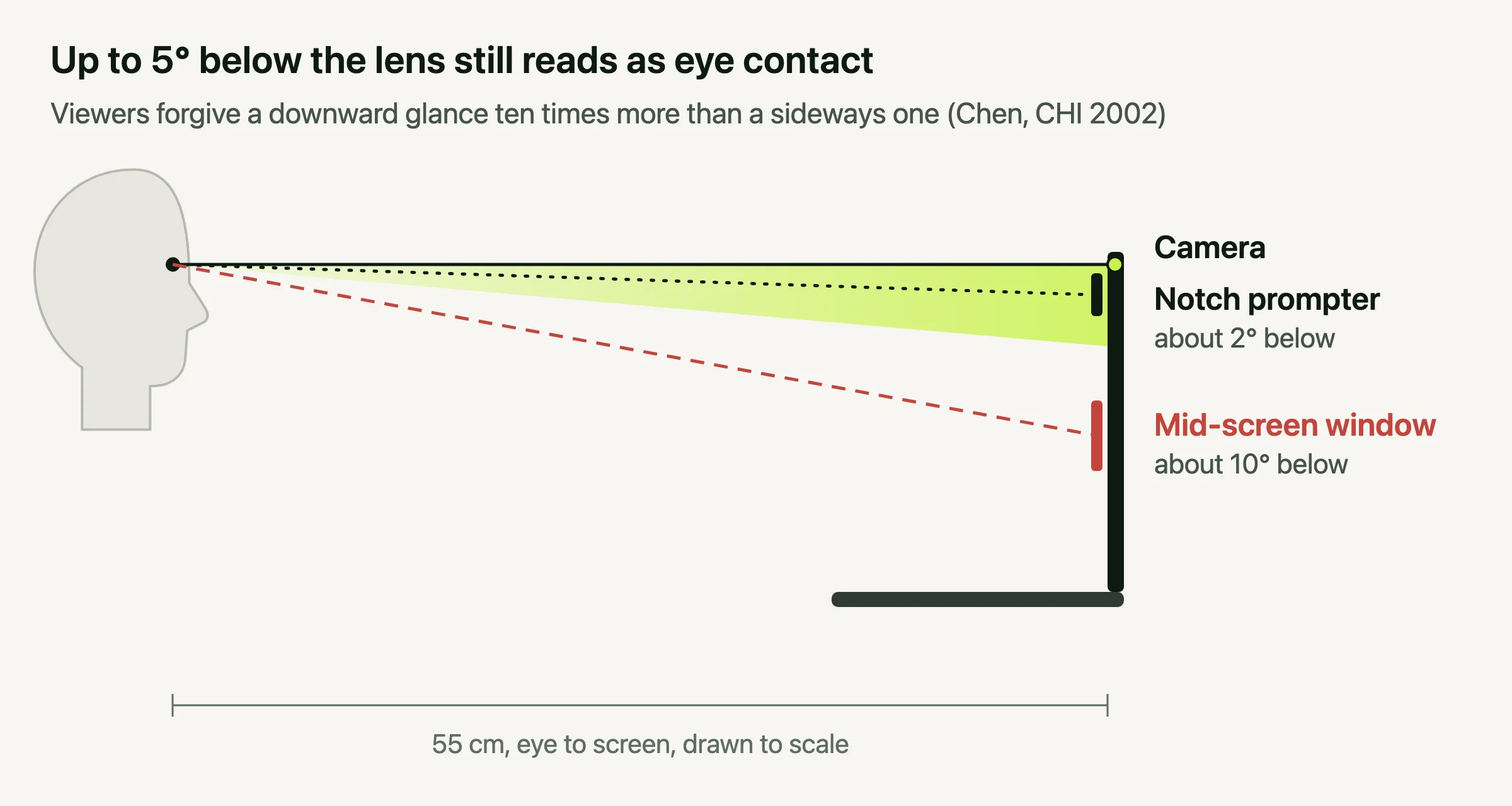
Every native app in this roundup can now put text there, keep it out of Zoom, Meet and OBS using the same macOS window setting, and scroll it as you talk using Apple's speech recognition or OpenAI's Whisper. If a comparison tells you one app is unique for any of that, it was written before this year. Only after the apps that sit in the notch? The notch teleprompters are compared here. (For the settings that keep your eyes inside that 5°, see teleprompter font and size.)
Six Things That Still Separate Them
1. How well it actually follows your voice
"Voice scrolling" is on every feature list, and it covers very different things. At the simple end, the app listens for sound and starts or stops a steady scroll, which is what Mootch's Simple Mode does. Better apps follow the words: Mootch's Smart Mode and Textream highlight the word you're on as you say it.
Avocado goes furthest, and it's the part of the app we've put the most work into. It follows the words to keep track of where you are in the script, and Adaptive Speed learns your natural pace and moves the text to match, so the script glides with you rather than jumping line to line. It reacts quickly when you slow down and is deliberately cautious when you speed up, so it never runs ahead of you. Stop talking and it stops. It learns a separate pace for each language you read in, matches the speech recognition to your script's language, lets you choose which microphone it listens to, and on macOS 26 runs on Apple's newest speech recognition. All of it happens on your Mac, and the pace it learns also feeds the rest of the app, from your session receipts to the scripts an AI assistant writes for you.
For English scripts it goes further still. Turn on Voice Labs in Settings › Voice and Avocado follows you word by word with far less delay, and lights up the next word you're about to say, so a glance finds your place. Go off script for a story or a joke and the text waits for as long as you talk, then picks up the moment you're back on the script. Skip a paragraph and the text is there within a second. Like the rest of Avocado's voice following, it runs entirely on your Mac, so your voice and your script stay private and it works offline.
This is the one feature you should judge for yourself rather than take from a table, ours included. Avocado's free tier includes three voice sessions a week, which is enough to read the same script in it and in any other app here and see which one keeps up.
2. What free really means
"Free" covers three very different deals in this field.
- Free apps with no paid version: Mootch, Textream, Snotch, NotchPrompter and QPrompt. You get everything they have, and nothing is held back. What you give up is a business behind them, so it's worth asking who maintains the app next year.
- Free tiers of paid apps, which range from token to substantial. CueNotch allows 3 activations a day on scripts of up to 100 words, which is a trial in practice. VoicePrompter allows 3 scripts. Avocado's free tier has no time or length limit: the full prompter at a speed you set, Script Markers, tags and search, PowerPoint import, mirror text and session receipts, plus 3 sessions a week with voice scrolling.
- Trials or refunds only: Notchie and Moody.
3. One payment or a subscription
A one-time app is cheaper if it already does everything you need. Over two years, CueNotch or Notchie costs $29.99 and Moody $39, against $159.98 for Avocado Pro paid yearly, or nothing on its free tier.
For a short job, the sums run the other way. If you need a prompter for one launch video, a conference talk or a course you're recording this month, a month of Avocado Pro costs $7.99, less than a third of the cheapest one-time app here. That month gets you everything: voice following that keeps up with you word by word, Recording Studio, Director Mode and every update that ships while you use it. Cancel when the job is done, and the free tier stays yours.
What a subscription pays for is updates, and update rates vary a lot. CueNotch shipped version 4.3.2 this week. Notchie's App Store listing shows its last update on 1 January. Avocado's public changelog lists 41 releases since the start of July, including a full redesign and a recording studio. Check the "Version History" on any App Store listing before you buy. It tells you more about where an app is going than its feature list does.
4. Which Mac it runs on
This one catches people out. Moody, Textream and VoicePrompter need macOS 15, and Notchie needs 14.6. Avocado, CueNotch and Mootch run on macOS 14. If your Mac is managed by an employer and a version behind, check before you fall for one.
5. What happens after the read
Most notch apps stop when the script ends. A few go further:
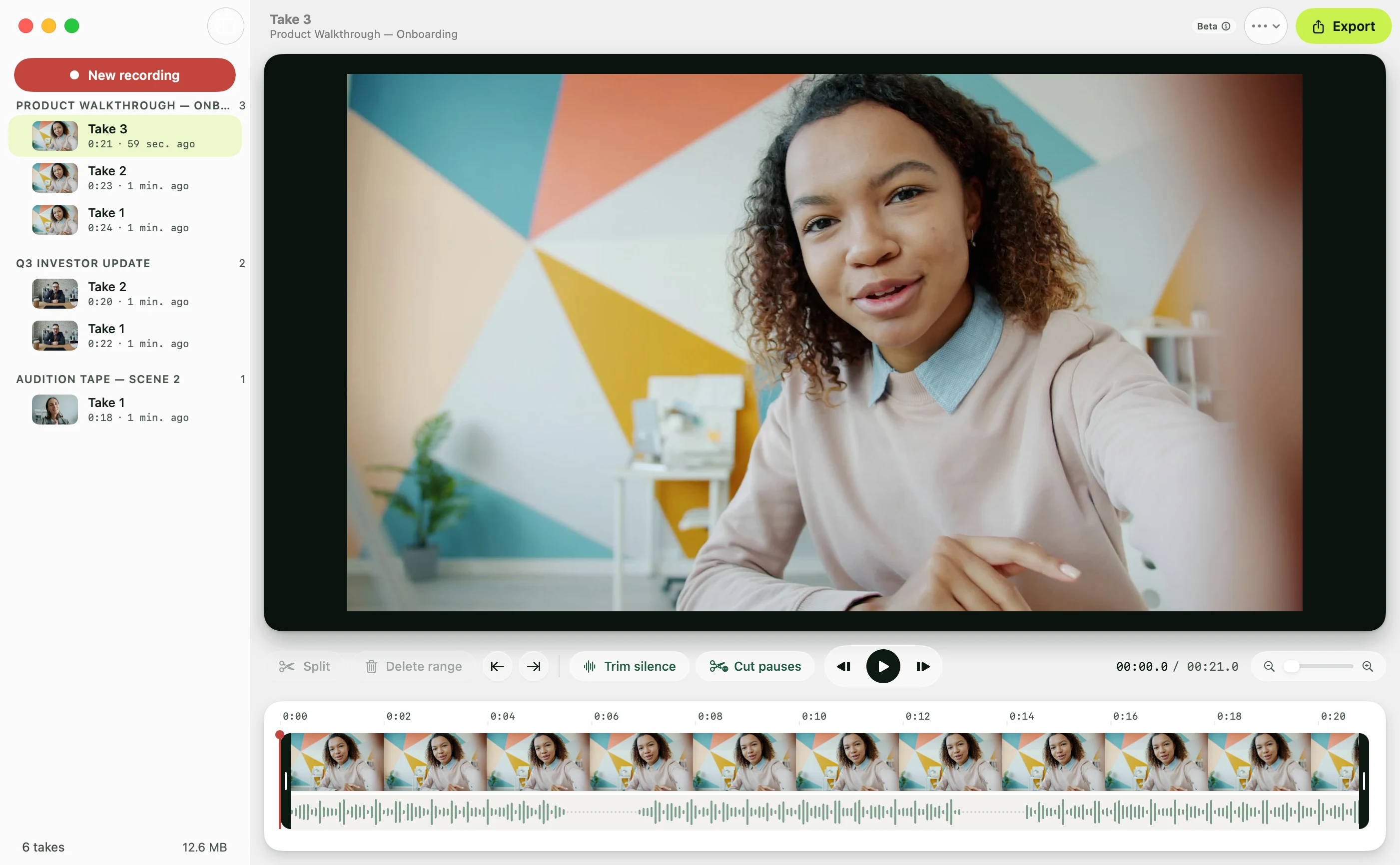
- Recording. Avocado's Recording Studio (Pro) films the take while the prompter runs, stops when you reach the last line, and cuts the pauses out in a click. Teleprompter Pro and Teleprompter.com record too, but neither sits in the notch.
- Feedback. CueNotch has a rehearsal coach. Avocado gives you a receipt after every run with your pace and completion, keeps the history for each script so you can see whether today beat Tuesday, and on macOS 26 counts filler words and long pauses on-device.
6. Everyone else in the room
Nearly every app assumes one person reading off one Mac. If someone else needs to run the prompter, or the script has to reach a second screen, the field gets small. Textream has a director mode and a browser remote. FluidPrompter and QPrompt drive dedicated rigs. Avocado's Director Mode lets a producer play, pause and jump through the script from their phone and send the presenter a message mid-take, and the Viewer mirrors the same script to five devices at once.
The same goes for AI. CueNotch and Snotch have AI writing built in. Avocado is the only one that lets the assistant you already use, Claude, Cursor or Codex, read and edit your script library directly, so a "three-minute script" can be sized to your real speaking pace rather than the 150 words per minute every model assumes.
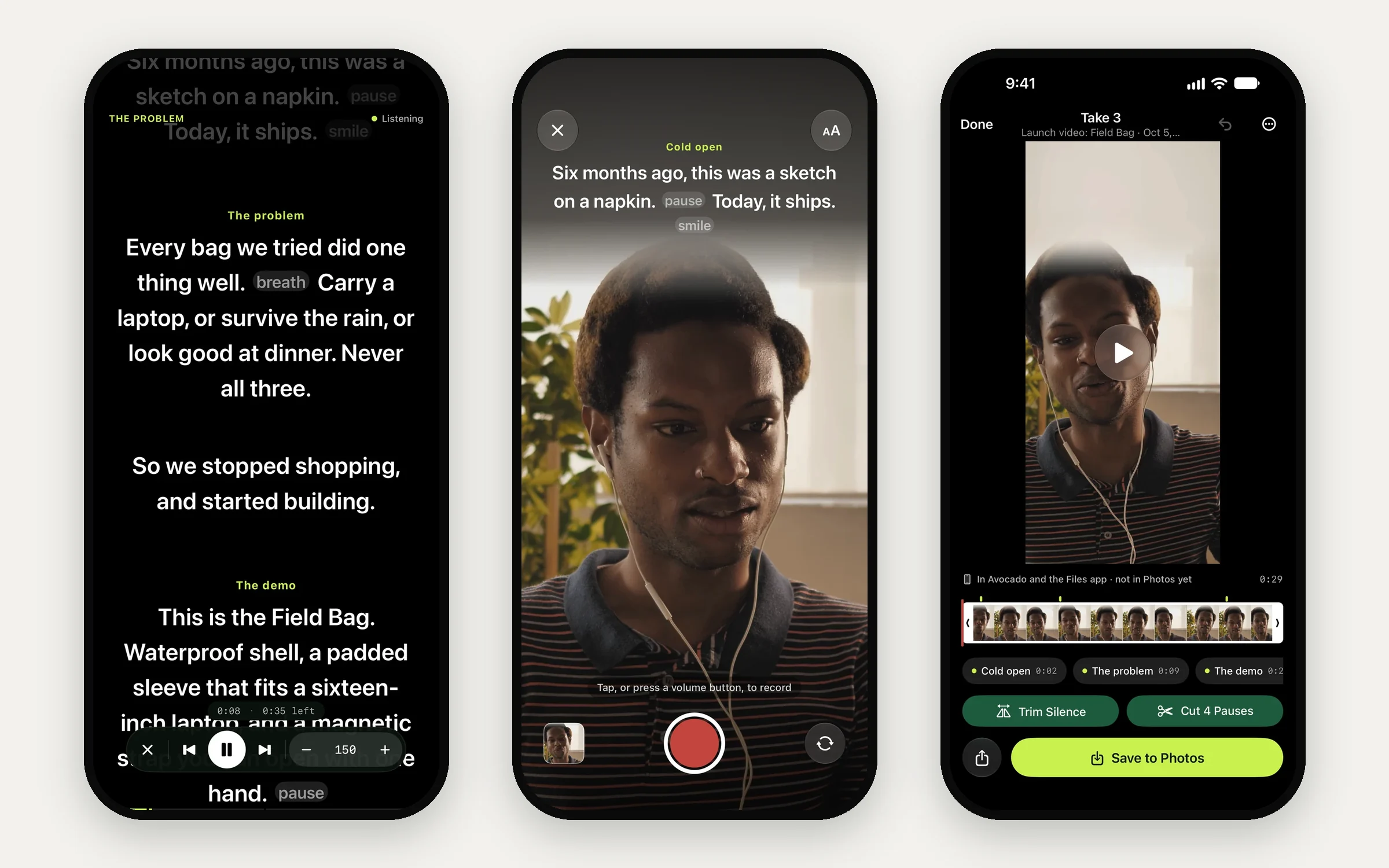
And some days the camera is a phone. PromptSmart Pro runs on iPhone and iPad, and so does Avocado, with its own app: the script sits right under the front camera and follows your voice, you record the take with the script on screen, and cut the pauses in one tap before you save it to Photos. An Apple Watch works as the remote.
The Apps, One by One
Avocado (free, Pro $7.99/mo or $79.99/yr, macOS 14+). The most complete of the notch apps. Its voice following is its standout: it tracks your place in the script and learns your pace, so the text moves with you instead of in steps, and for English scripts it follows word by word, marks the next word and waits out an ad-lib. Around that sits the rest: a script library with tags and Script Markers, PowerPoint import, rehearsal history, Director Mode and the Viewer, a recording studio, and access for AI assistants. It was redesigned in version 4.0 in September and looks like part of macOS. It's also on the Mac App Store, which matters on managed Macs, and has an iPhone and iPad app. The trade-offs: unlimited voice scrolling, Director Mode and Recording Studio need Pro, and Pro is a subscription. Pick it if you'll use a prompter most weeks, or for more than reading.
CueNotch ($29.99 once, or $7.99 a week, macOS 14+). A pay-once app, updated often. It has voice scrolling, folders, imports from Word, PDF and PowerPoint, live captions, a memorise mode and a rehearsal coach. The free tier is tight at 3 activations a day and 100 words a script. Pick it if you'd rather pay once. Avocado vs CueNotch →
Mootch (free, macOS 14+). Entirely free, with on-device Whisper tracking that highlights the word you're on, a volume-based mode that just pauses when you stop, and a plain auto-scroll. It runs from the menu bar and stays small. Pick it if you want a good prompter and nothing else, for nothing.
Textream (free, MIT, macOS 15+). The most inventive of the open-source apps: word-by-word highlighting, a Dynamic Island-style overlay, a director mode that pushes scripts from any browser, and Sidecar to an iPad. Its macOS 15 requirement rules out older Macs. Avocado vs Textream →
Snotch (free, MIT). New this year, with a second version in July. Voice scrolling, screen-share invisibility, and the ability to generate and edit a script from the overlay itself. Young, with a small community so far.
NotchPrompter (free, MIT). Does the core job properly, with voice activation, invisibility and multi-monitor support, and nothing around it. Avocado vs NotchPrompter →
Notchie ($29.99 once, macOS 14.6+, also in Setapp). Simple and tidy, with size, font, speed and opacity settings and nothing more. No free tier, and no update since January. Avocado vs Notchie →
Moody ($39 once, macOS 15+). The same core notch features as Notchie at $10 more, sold as a direct download. Its iPhone app is a separate subscription. Avocado vs Moody →
VoicePrompter (free tier, paid plans, macOS 15+). Voice scrolling in more than 60 languages, which makes it the one to try if you present in a language the others handle poorly.
PromptSmart Pro ($29.99 once, optional $34.99/yr). The veteran, and the only one that covers iPhone, iPad, Mac and Vision Pro with one purchase. Its VoiceTrack predates most of this field, and it imports from Drive, OneDrive, Box, Dropbox and iCloud. Screen-share invisibility isn't among its listed features, so it suits recording better than live calls.
Teleprompter Pro (free, $59.99/yr or $159.99 lifetime). Formerly Teleprompter Premium. A generous free tier with recording and cloud sync, and a clean feed over HDMI or AirPlay for driving a physical prompter. It isn't a notch app and doesn't list capture invisibility. Avocado vs Teleprompter Pro →
Virtual Teleprompter ($7.99 once, free version capped at 1,000 characters). The budget option. It's an ordinary window, so it shows up when you share your screen.
QPrompt (free, GPL v3, also Windows and Linux). Built for people operating real rigs, with markers, a stopwatch and a rich text editor. No voice scrolling and no invisibility, so it's for a studio rather than a Zoom call.
Outside the notch
Teleprompter.com combines prompting with 4K recording, subtitles and sync across iPhone and iPad. Pro is $19.99 a month, or $7.50 a month billed yearly, and the free tier watermarks recordings. It runs as a normal window, so it shows on a screen share. Avocado vs Teleprompter.com →
Browser tools work on any computer with nothing to install, but they're always visible on a screen share. CuePrompter is completely free, with no account and no watermark (compared here). Speakflow is the most polished, with limited voice scrolling on the free tier and Plus at $15 a month billed yearly. FluidPrompter is the serious choice for hardware rigs, with mirroring and support for foot pedals and stream decks. EasyPrompter has separate operator and presenter screens and a speech-recognition mode.
Riverside and Borumi are recording platforms that include a prompter. Riverside's prompter needs its Pro plan, from $24 a month billed yearly. Both make sense if editing is your bottleneck, and neither hides from a live call.
Can You Use an Online Teleprompter on a Mac?
Yes. Browser teleprompters such as CuePrompter and Speakflow run in Safari or Chrome on any Mac, with nothing to install. They're fine for reading at a desk with no one watching your screen. They fall short in three places that matter for most Mac users:
- They show on a screen share. A browser tab is an ordinary window, so everyone on a Zoom, Meet or Teams call sees your script the moment you share your screen. Native notch apps hide from screen sharing at the system level.
- They sit wherever the window is. Unless you shrink the tab and drag it right under the camera every time, you read from the middle of the screen, about 10° below the lens, and viewers can see you looking down.
- Your script goes to their servers. That's how a web app works. For anything confidential, an app that keeps everything on your Mac is safer.
A native app costs nothing extra to try. Avocado is free to download, opens in the notch right next to the camera, stays out of screen shares and recordings, and works offline. If you only need a browser tab for a quick recording, our free online teleprompter keeps your script on your device instead of a server.
