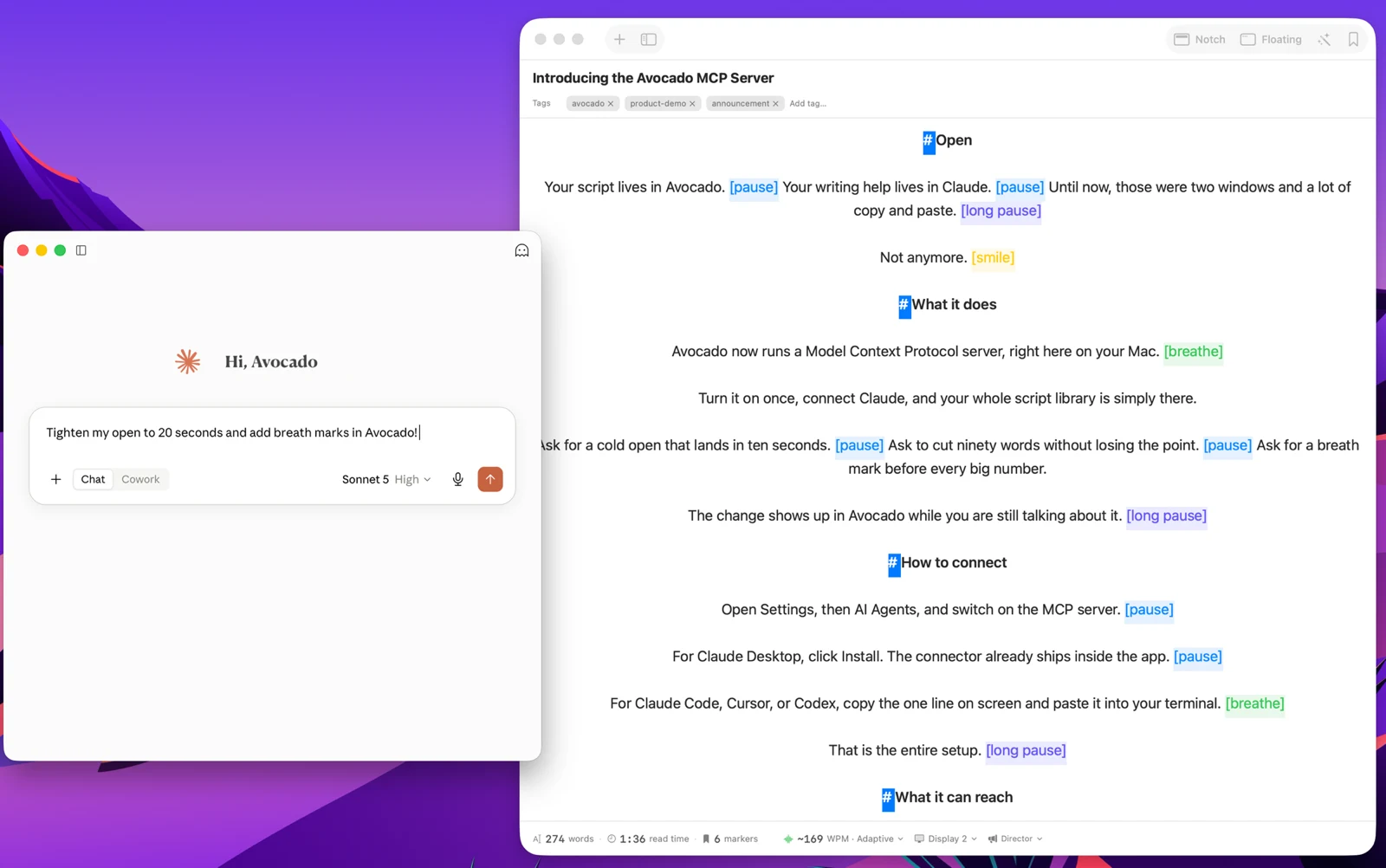
The Paste
Watch anyone write a video script in 2026 and the shape is always the same. Ask an assistant for a draft. Read it back, decide the opening is soft. Paste the result into whatever app is going to scroll it past the lens.
Then you spot something on the third line, and round it goes again — other window, ask for the fix, copy, return, paste, lose whatever you had already marked up. The writing happens in one app, the reading happens in another, and the gap between them is filled with clipboard.
Avocado now closes that gap. Switch on the MCP server in Settings → AI Agents, connect the assistant you already use, and your script library becomes a place it can write.
What That Looks Like
You ask in the assistant. It lands in Avocado while you are still typing.
- "Tighten my open to 20 seconds and add breath marks." The opening shortens and the marks land where you need to breathe.
- "Cut ninety words without losing the third point." The script comes back shorter with the argument intact.
- "Draft a two-minute version of this for Instagram." A new script appears in your sidebar, titled and tagged.
- "Which of my scripts mention the pricing change?" It reads the library and tells you.
It can read anything in your library, write new scripts, and rewrite, rename, tag, or bin the ones you already have. It can also list the video takes you have recorded, which comes up further down. Nothing is imported or exported along the way — it is the same script you were going to read, edited where it lives.
The Three-Minute Problem
Here is the part that surprised us while building this.
Ask any assistant for "a three-minute script" and you get roughly 450 words, because the number every model reaches for is 150 words per minute. That figure is an average of a population. You are not a population. Plenty of confident presenters land near 175. Plenty of careful ones sit at 130.
Say you actually speak at 168. Those 450 words run 2:41. You wrote three minutes of content and you will finish nineteen seconds early — and you will not notice, because the script says three minutes and it felt fine to read.
Nineteen seconds is survivable once. The trouble is that it is not once. If you run twelve percent fast, then every script you have ever asked for has been twelve percent too short, in the same direction, forever. A ten-video series comes in three minutes light. A conference slot you rehearsed to the second leaves you standing in silence. A client asked for sixty seconds and got fifty-three.
Avocado already knows your real number. Adaptive Speed has been measuring it every time you read, and your session reports have been recording it for months. A connected agent reads your session history, which has its own switch in Settings if you'd rather keep it private, and sizes the script with your pace instead of the average one. If you have never measured your own pace, this is where it starts paying rent.
Writing Against the Take, Not the Page
The more interesting thing shows up on the second run.
A script is easy to judge on the page and hard to judge out loud. It reads well, then you record it and the fourth paragraph turns out to be unsayable — a sentence with three clauses that leaves you out of air, a number you stumble over every time, a transition you keep re-reading because it does not land where you expect.
Once the agent can see your runs, that stops being a feeling you have to describe. It can see the take ran twenty seconds long, that you got forty percent in before stopping, that the same paragraph slows you down on every attempt. So the ask changes shape:
- "That run went twenty seconds over. Take forty words out of the middle."
- "I keep stalling on the pricing paragraph. Rewrite it so it is easier to say out loud."
- "Compare my last three runs of this — is it getting tighter?"
Worth saying plainly: this data describes how you speak, not what your script says. A filler word is a speaking habit, and no rewrite fixes it. But sentence length, breath points, and where a script asks too much of you in one go — those are the script's fault, and they are exactly what a run reveals and a read-through hides.
Your Takes, Too
If you record in Avocado's Recording Studio, the agent can see those takes as well. Ask about them and it gets back which script each take belongs to, the take number, when you recorded it, how long it runs, and where the movie file sits on your Mac, newest first.
It does not watch the video. What it can do with a take depends on the assistant. Claude Code and Codex can work with files on your Mac, so for them the path is a handle on the real recording:
- "Transcribe my last take of the launch video and show me where I went off script."
- "Export take 3 of the investor update with my trims, as an MP4 I can upload."
- "Pull the audio out of today's takes for the podcast feed."
An assistant that can't open your files can still tell you which take was the short one, how many times you have recorded a script, and which file to reach for.
Your trims come along too. Avocado never edits the recording on disk: when you cut a silence in the Studio, it keeps a note of the parts you kept, and the agent gets those same cut points. So when it cuts the file with a tool like ffmpeg, the result matches the take you trimmed in Avocado, not the raw recording.
This part is read-only. The agent gets each take's details and file path, never the video itself, and your recordings stay in your Movies folder, where only an assistant that can read your files can open one. Takes are matched to scripts by the title a script had when you recorded, so a script you have renamed since won't find its older takes.
Connecting
Open Settings → AI Agents and switch on the MCP server. It is part of Avocado Pro, and it works with anything that speaks the Model Context Protocol.
For Claude Desktop, click Install — the connector ships inside the app, so there is nothing to download. For Claude Code, Cursor, or Codex, copy the single line on screen and paste it into your terminal. That is the whole setup, it survives restarts, and switching the toggle back off ends the connection the same second.
The Small Shift
Teleprompter software has spent forty years as a thing you put finished text into. The text arrived from somewhere else, already done, and the prompter's job was to move it upward at a sensible speed.
That made sense when scripts were written in word processors. It makes less sense now that they are written in a conversation — and that the conversation can reach both the script and the record of how it went last time you read it aloud.
