The Short Answer
Yes, TikTok has a teleprompter, but not everyone has the same one. Newer versions of the app have a teleprompter in the camera's recording tools, rolling out account by account, and many creators use the Teleprompter effect instead (Effects › search "Teleprompter"). Either way, you paste your script, set the speed and record. Both scroll at a speed you pick, and the script lives inside TikTok. When you want the script to follow your voice, or captions and clean takes before you post, record in a teleprompter app and upload the video.
How to Use TikTok's Teleprompter
TikTok changes its camera often, so the labels may differ on your phone. As of October 2026:
- Open the camera. Tap + and stay in video mode.
- Find the teleprompter. Look in the tools down the side of the camera. If it isn't there, tap Effects and search for "Teleprompter".
- Add your script. Type or paste it. Keep the lines short, so your eyes don't sweep across the screen.
- Set the speed and size. Pick a speed you can keep up with on a bad day, not your best one.
- Put it near the top. Drag the text as close to the front camera as it goes. Viewers read a glance as eye contact when you look up to about 5° below the lens, and notice almost any look further down. (Here's why the direction matters.)
- Test, then record. Record five seconds and play it back to check the script isn't in the clip, then record the real take.
If neither shows up, update the app. TikTok rolls features out by version and region, so some accounts get them weeks after others.
Instagram and CapCut Have One Too
- Instagram. Instagram's Edits app added a teleprompter in June 2025: open the Edits camera, tap the script icon, and paste your script. You can drag it anywhere on the screen and set the speed. Instagram has since started rolling one out in its own camera.
- CapCut. CapCut's phone app has one under All tools › Quick actions › Teleprompter. Here's how to use it and what it can't do.
They all work the same way: a speed you set before you start, inside the app you'll post from.
What a Built-In Teleprompter Can't Do
- Wait for you. The script scrolls at the speed you set. Slow down for a point or stop to laugh and it keeps going, so most people re-record until their pace matches the slider.
- Clean up the take. Dead air at the start and end, long pauses in the middle and captions are all separate jobs in the editor afterwards.
- Go anywhere else. A script in TikTok's camera is no help when the same video is going to Reels and Shorts too.
When You Want the Script to Follow You
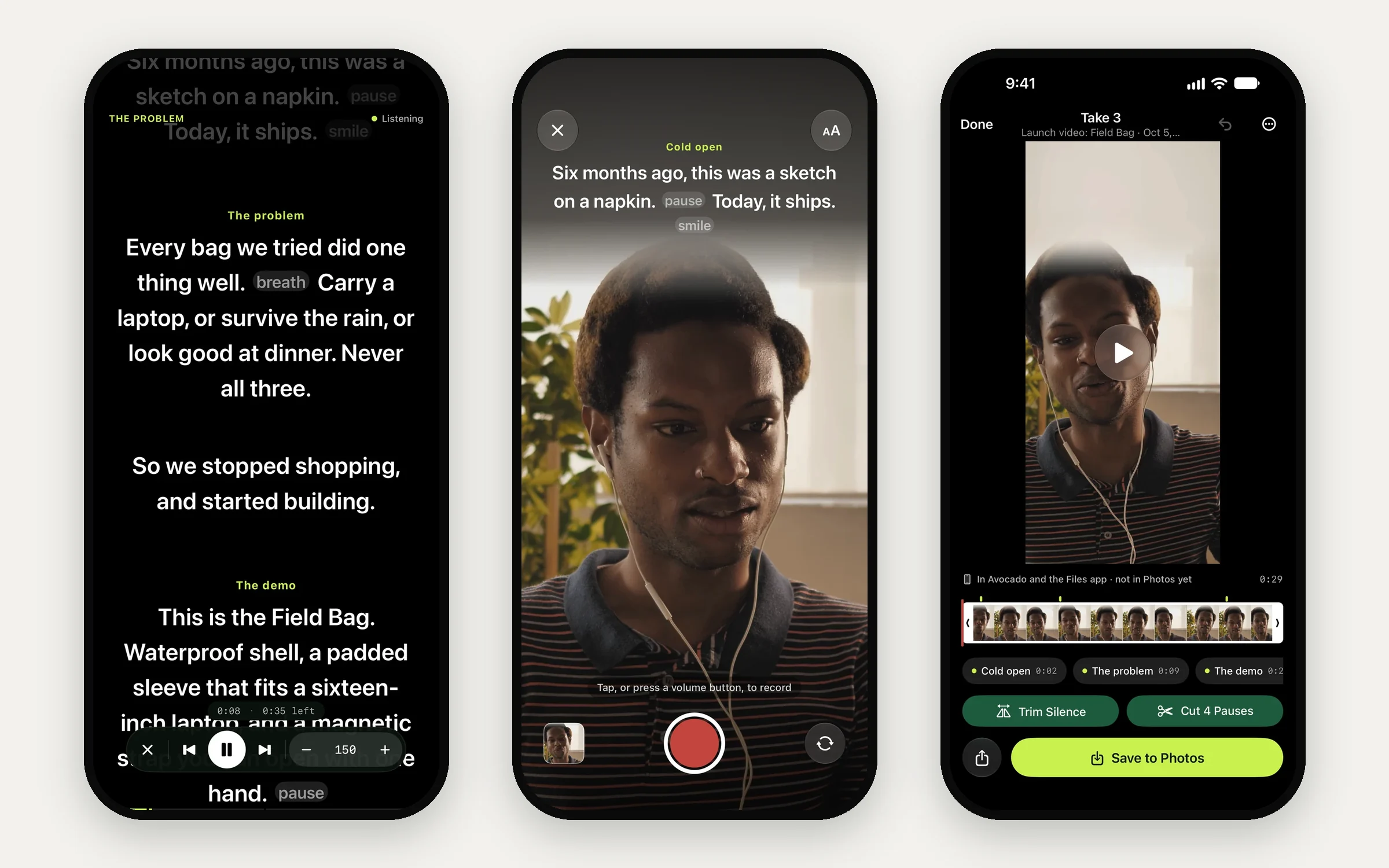
Avocado is a teleprompter app for iPhone and iPad. Your script scrolls in a band right under the front camera, and with Avocado Pro it follows your voice: it moves while you talk, waits while you pause or ad-lib, and runs the speech recognition on your phone. The free version scrolls at a steady 50 to 300 words a minute, with no time limit.
A short-form workflow that works:
- Write it in Avocado. Start a line with # to make a cue for each beat, and add [pause] where you want a breath. Write the hook last, and read it out loud.
- Record in Avocado. With Pro, the volume buttons start a take, and it stops a beat after your last line. An Apple Watch can start it from across the room.
- Clean it up. Trim Silence and Cut Pauses take out the dead air in one tap. The take is 9:16 already, and you can export 4:5 or 1:1 for feed posts.
- Caption it. Turn on captions and each word lights up as you say it, spelled from your script so names come out right. They're burned into the video you save. (How that compares with TikTok's own captions.)
- Post it. Save to Photos and upload the same file to TikTok, Reels and Shorts.
Reading on TikTok Without Sounding Like It
- Lead with the line that earns the next five seconds. Say it in your first breath, with no greeting first.
- Talk at 150 to 180 words a minute. Short videos reward energy, but rushed words still lose people. Cut words before you speed up. (How fast to speak on camera.)
- Write the way you talk. Contractions, short sentences, one idea per line. There's a template in how to write a video script.
- Rehearse twice, then record. The first two reads get the reading out of your voice.
On a Computer?
TikTok's teleprompter is in the phone app. If you film on a MacBook, Avocado for Mac puts your script in the notch, right next to the camera, and stays out of your screen recordings. On Windows or a Chromebook, the free online teleprompter runs in any browser.