The Short Answer
A confidence monitor is a screen placed in front of a speaker, facing them and out of the audience's view, that shows what they need to stay on track: the current slide, the next slide, speaker notes and a timer. It's usually on the stage floor at the front, or at the back of the room above the audience's heads. The name comes from what it does: you can glance at it and carry on, instead of turning round to read the big screen behind you.
It isn't a teleprompter. A teleprompter puts your script in line with the camera or your eyeline, so you can read it word for word while looking at the audience. A confidence monitor sits off to one side or below, and you glance at it.
What a Confidence Monitor Shows
What's on it depends on the speaker and the event, but these are the usual choices:
- The current slide, so you know what the audience is looking at without turning round.
- The next slide, so you can set it up before you click.
- Speaker notes: a few prompts per slide, not a full script.
- A timer or clock, often counting down the time left in your slot.
- Messages from the organiser or stage manager, such as "5 minutes" or "wrap up".
PowerPoint's Presenter View and Keynote's presenter display were built for this. On a laptop with a second screen attached, the audience sees the slides and the laptop shows the presenter view, and a venue can send that same presenter view to the floor monitors. There's more on setting both up in how to use a teleprompter with PowerPoint and Keynote.
Confidence Monitor vs Teleprompter
| Confidence monitor | Teleprompter | |
|---|---|---|
| Where it sits | On the stage floor, or at the back of the room | In front of the camera lens, or on glass either side of a lectern |
| How you read it | Glance down or across, then look back up | Read while looking straight ahead |
| What it shows | Slides, next slide, notes, timer | The full script, scrolling |
| Best for | Talks you know well, from notes | Word-for-word scripts, and anything to camera |
| Mirrored text | No | Yes, when it reflects off glass |
The big conference stages often have both: floor monitors for slides and timing, and a pair of glass panels on stands either side of the lectern for a scripted speech. Those glass panels are teleprompters, not confidence monitors, even though they sit near the stage too. How a teleprompter works.
Where to Put One
- On the stage floor, at the front, angled up at the speaker. This is the most common spot. Keep it low enough that the audience can't read it, and close enough that a glance is all it takes.
- At the back of the room, above the audience. You can read it while looking out at the room, so your head stays up. It needs a big screen and large text to read at that distance.
- On the lectern, if you're speaking from one. A laptop or tablet works, but every look down at it is a look away from the audience.
Whichever you use, make the text bigger than you think you need, and check it from where you'll actually stand before the audience arrives.
The Confidence Monitor on a Video Call
On a video call or a recording, your screen is the confidence monitor, and the camera is the audience. The problem is the same as on a stage: every time you look at your notes, you look away from the people watching. On camera it's more obvious, because the camera sees exactly where your eyes go.
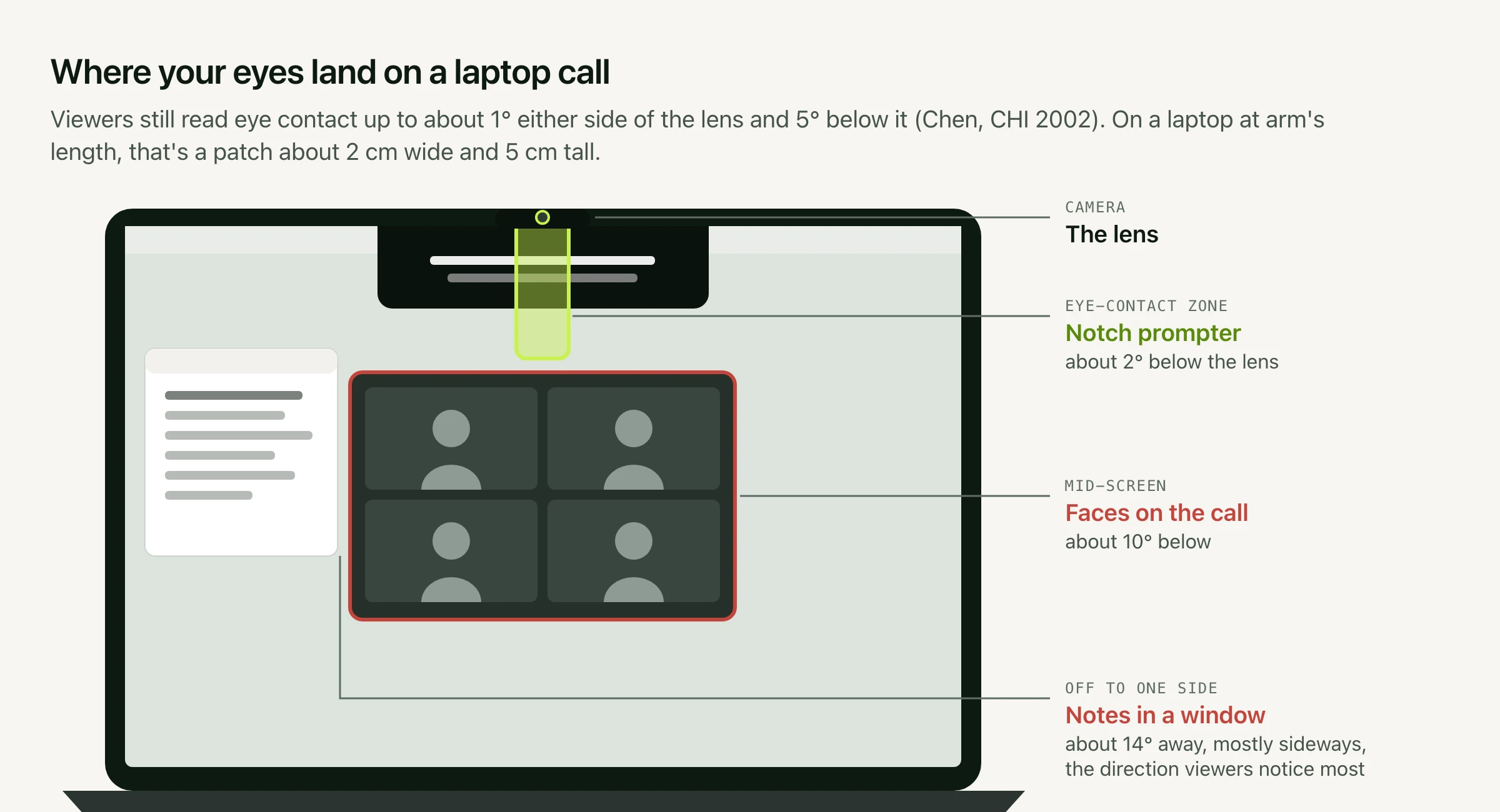
Research on video calls found that viewers still read a look as eye contact up to about 5° below the lens (Chen, CHI 2002). The faces on a laptop call sit about 10° below, and notes in a side window about 14° away, which is why reading from either shows. Text has to sit right under the camera to stay inside that 5°.
That's what Avocado does on a Mac: it puts your script or notes in the MacBook notch, about 2° below the lens, where reading them still looks like eye contact. It stays hidden when you share your screen or record it, and it can import a PowerPoint deck as your presenter notes, one section per slide. More in how to make eye contact on camera.
A Phone or Tablet as a Confidence Monitor
For a talk, a workshop or a recording with a separate camera, a phone or tablet can be your confidence monitor. Avocado's Viewer mirrors the script from your Mac to any phone, tablet or computer on the same network, in a web browser with no app to install, so you can put an iPad on the floor or next to the camera and keep your Mac at the lectern (Pro, up to five devices). How the Viewer works.
No Mac? Our free online teleprompter runs in any browser, so a tablet on its own can show your notes at a size you can read from a few steps away.
