The Short Answer
A good wedding speech is three to five minutes long, about 375 to 625 words. It says who you are, tells one story that shows who the person you're speaking about really is, turns to the couple, and ends with a toast. Write it the way you talk, read it aloud at least five times, and on the day read it from cards or your phone rather than trusting your memory.
How Long Should a Wedding Speech Be?
Three to five minutes. Wedding planners and speechwriters land in that range again and again, and the reason is the room: people are sitting at tables, often with a drink, and their attention fades well before yours does. Nobody has ever complained that a wedding speech was too short.
Words are easier to plan than minutes. Conversational English runs at about 150 words a minute, but a wedding speech goes slower, because you stop for laughs, for applause, and for the moment you look at the couple. Plan on about 125 words a minute:
- 2 minutes: about 250 words. Right for a short toast or one of many speakers.
- 3 minutes: about 375 words. The sweet spot for a best man or maid of honor at a wedding with several speeches. (More on 3-minute speeches.)
- 4 minutes: about 500 words.
- 5 minutes: about 625 words. The upper limit for most speeches, including the father of the bride. (More on 5-minute speeches.)
If there are four or five speeches, aim for the short end. Paste your draft into the speech length calculator to see how long it really runs at your pace.
A Wedding Speech Template
Almost every speech that works has the same five parts. Fill these in and you have a first draft:
- Who you are (15 seconds). "For those who don't know me, I'm Jordan, Sam's older brother, and I've known him longer than anyone here except our mum."
- One story (1 to 2 minutes). A real moment that shows who Sam is: kind, stubborn, hopeless with directions, whatever is true. One story told well beats five told quickly.
- The turn to the couple (1 minute). When did you first notice Sam was different around Alex? What does Alex bring out in him? This is where the speech stops being about the past.
- A wish (30 seconds). What you hope for them. Keep it specific to them, not a line that could be said at any wedding.
- The toast (15 seconds). "Please stand and raise your glasses. To Sam and Alex."
The story carries the speech, so spend most of your writing time there. Pick one that has a small arc: something happened, it went sideways, and it showed you something about the person. If the story is about one half of the couple, make sure the turn brings the other half in properly.
How to Start a Wedding Speech
Start with who you are and how you know them, in a sentence or two, then get into the story. Three openings that work:
- Straight in: "I'm Priya, Alex's best friend since we were eleven, and I want to tell you about the day she tried to adopt a goat."
- The first meeting: "The first time I met Sam, he was standing in the wrong lecture hall, insisting it was the right one."
- A thank-you: "Before anything else, thank you to Alex's parents for a beautiful day, and for raising someone this good."
What to avoid: a long run-up about being nervous, a joke borrowed from the internet, and starting with "the dictionary defines marriage as". The room is on your side from the first sentence. Use it.
How to End a Wedding Speech
End with the toast, and make it the clearest moment of the speech. Ask everyone to stand, wait for them to do it, raise your own glass, and say the couple's names. Then stop. The most common mistake is adding one more thought after the toast, which makes the ending feel like it fell off a cliff. Learn your last two sentences by heart, so you can deliver them looking at the couple.
Write It for the Ear
A speech is heard once, at the speed you say it. That changes how to write it:
- Short sentences. If you run out of breath reading a sentence aloud, split it.
- Names, not pronouns. "Sam" is clearer than "he" when the room has had a glass of wine.
- Leave space for laughs. Mark where you expect one, and plan to wait for it instead of talking over it.
- Cut what only three people will get. Inside jokes leave the other 97 guests outside.
- Read every draft out loud. Lines that look fine on paper often sound stiff. Writing for the ear works the same way for a speech as for a video script.
Notes for Each Speech
- Best man or maid of honor: the story is your job, so it can be the funniest speech of the day. Teasing is fine. Humiliation isn't. Keep it to three or four minutes if the parents are also speaking.
- Father or mother of the bride or groom: the welcome and the thank-yous usually sit with you, so put them first and keep them short. Then a memory of your child, and a welcome to the person they've married.
- Bride or groom: thank people by name for what they actually did, then speak to each other. It's the one speech where a few sentences to your partner matter more than the room.
- Officiant or friend reading at the ceremony: slower and quieter. The room is silent, so every pause carries.
Reading Your Speech From Your Phone
You don't have to memorise a wedding speech, and you probably shouldn't. Under the lights, with a microphone and the people you love watching, memory is the first thing to go. Paper and cards work, but most people already have their speech on their phone, and a phone can do better than a page of small text.
The trouble with reading from the Notes app is where your eyes go. You scroll with your thumb, lose your place, and read the screen at waist height, which is the image everyone remembers. A teleprompter app fixes that. Avocado on iPhone keeps the line you're reading near the top of the screen, so your eyes stay close to the room, and it can move the script for you:
- It follows your voice. With Avocado Pro, the script scrolls as you speak and waits while you pause for a laugh. Speech recognition runs on your iPhone, so it doesn't need the venue's Wi-Fi.
- Or it scrolls at a steady pace. The free version scrolls at any speed from 50 to 300 words a minute. For a wedding, start around 120.
- Mark your sections. Start a line with # to make a cue, one for each part of the template, so you can jump straight to the toast if the speech before yours ran long. Add [pause] where you expect a laugh.
- Hands full? If the phone sits on a lectern or table, the free Apple Watch app runs it from your wrist: play, pause, and a tap at each cue so you know where you are without looking down.
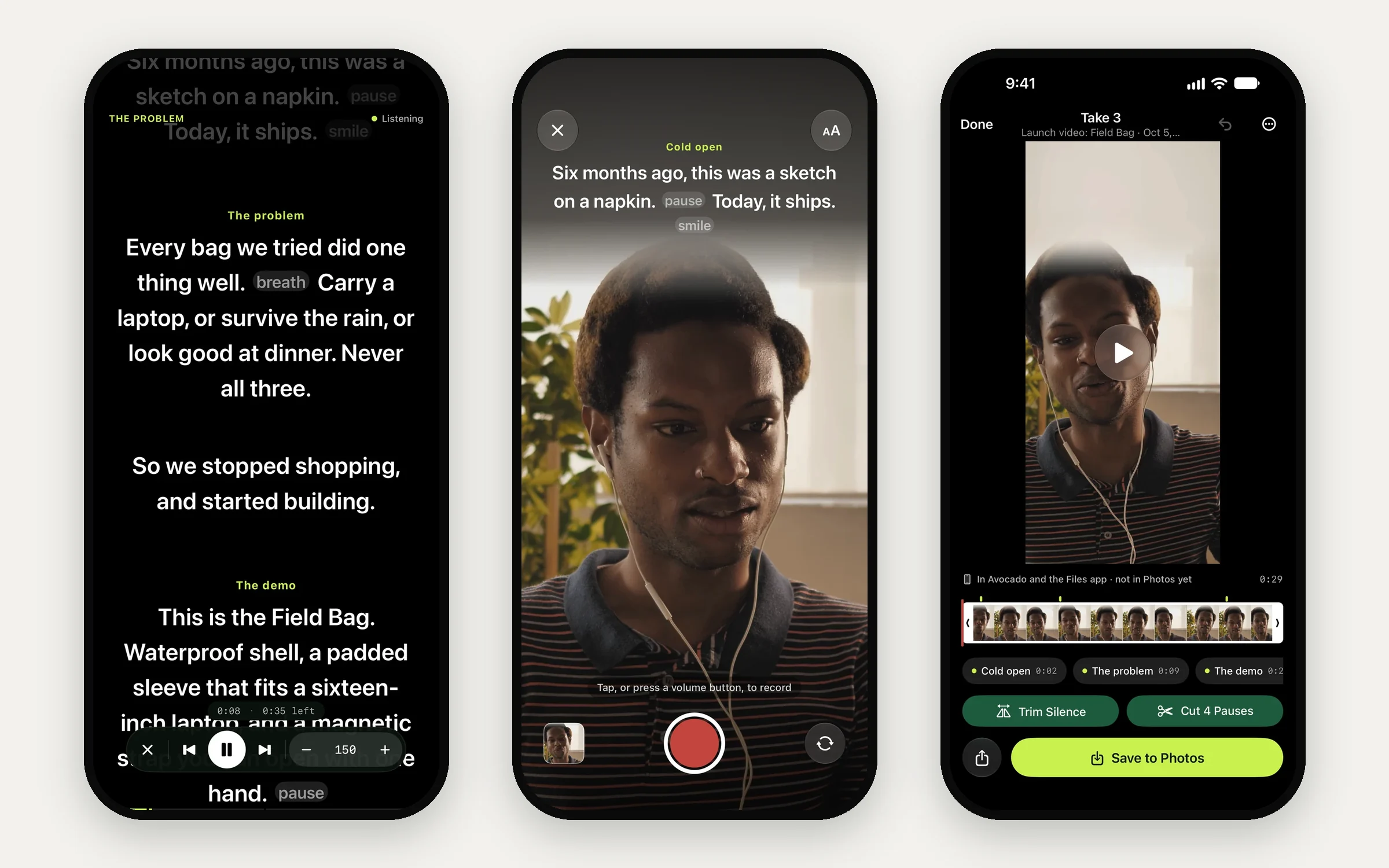
Before the speech, turn on Do Not Disturb, turn the brightness up, charge the phone, and lock the screen orientation. Hold the phone at chest height in the hand without the microphone. Look up at the end of each sentence, and always for the toast.
Rehearse It Out Loud
Read the speech aloud, standing up, at least five times before the day. Time it each run: most people find the first read is far longer than they expected, and then cut. Rehearse with the phone or cards you'll use on the day, so the scroll speed and the cues are already familiar.
Recording a rehearsal is the fastest way to hear what the room will hear. In Avocado Pro, the volume buttons start a take with the script under the front camera, so you can watch yourself back and see whether you're looking up. Your last run-through the night before should feel almost boring. That's how you know it'll hold on the day.
Avocado is free on iPhone and iPad, with no watermark and no time limit. Paste your speech in tonight and give it a read.